> ## Documentation Index
> Fetch the complete documentation index at: https://docs.taxibutler.com/llms.txt
> Use this file to discover all available pages before exploring further.
# Understanding & using the Statistics page
> The Statistics page shows all of your locations with a device linked.
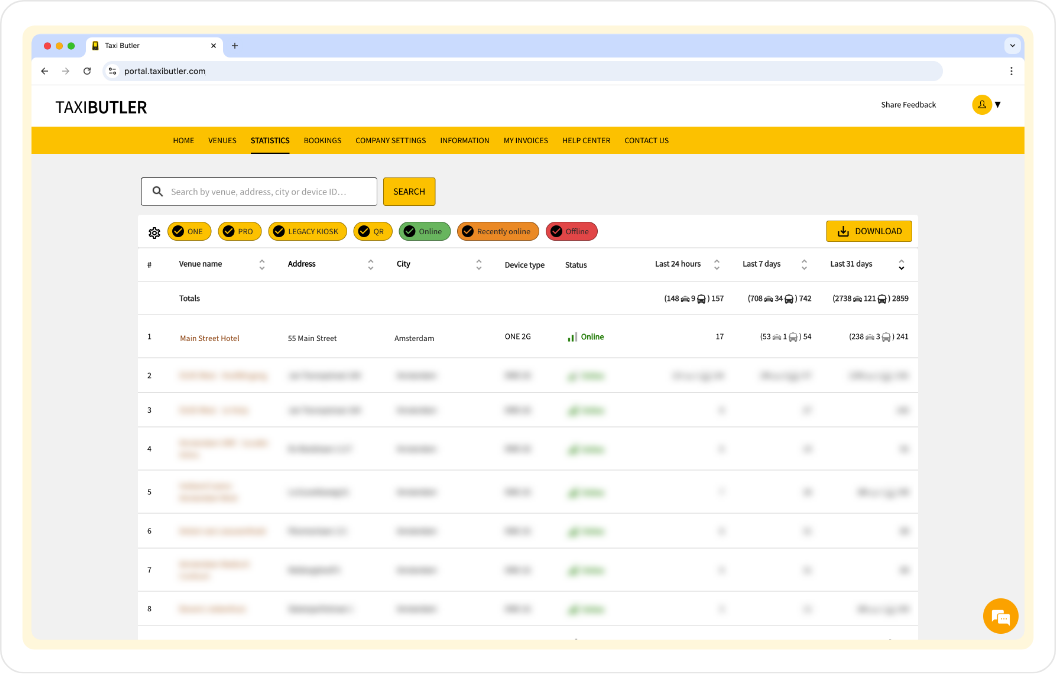 Similarly to the [Venues](/fleets/portal/pages/venues) page, you can see all of your venues, however, the Statistics page only shows venues that have a device linked to them.
The Statistics page provides more specific information about a device's statistics per venue.
**The Statistics table includes various data and properties listed below.**
The name of the location where the device is installed.
The street address of the venue.
The city in which the venue is located.
A unique identifier assigned to the Taxi Butler device installed at the venue.
Specifies the model of the device.
Indicates the current operational status of the device (e.g. online, recently online, offline).
You can hover over the Status to see more information.
The total number of bookings processed on the device in the past 24 hours.
If applicable, you will also see how many bookings have been made using the [secondary booking mode](/fleets/portal/venues/configuring-devices#taxi-butler-one).
The total number of bookings processed on the device in the past 7 days.
If applicable, you will also see how many bookings have been made using the [secondary booking mode](/fleets/portal/venues/configuring-devices#taxi-butler-one).
The total number of bookings processed on the device in the past 31 days.
If applicable, you will also see how many bookings have been made using the [secondary booking mode](/fleets/portal/venues/configuring-devices#taxi-butler-one).
You can search for venues and sort various columns by ascending or descending order to find the information you need easily.
As well as being able to search for venues using the search bar, you can filter the list of venues by type of device by using the buttons below the search bar.
Additionally, you can choose with columns to show on the page using the gear icon.
Similarly to the [Venues](/fleets/portal/pages/venues) page, you can see all of your venues, however, the Statistics page only shows venues that have a device linked to them.
The Statistics page provides more specific information about a device's statistics per venue.
**The Statistics table includes various data and properties listed below.**
The name of the location where the device is installed.
The street address of the venue.
The city in which the venue is located.
A unique identifier assigned to the Taxi Butler device installed at the venue.
Specifies the model of the device.
Indicates the current operational status of the device (e.g. online, recently online, offline).
You can hover over the Status to see more information.
The total number of bookings processed on the device in the past 24 hours.
If applicable, you will also see how many bookings have been made using the [secondary booking mode](/fleets/portal/venues/configuring-devices#taxi-butler-one).
The total number of bookings processed on the device in the past 7 days.
If applicable, you will also see how many bookings have been made using the [secondary booking mode](/fleets/portal/venues/configuring-devices#taxi-butler-one).
The total number of bookings processed on the device in the past 31 days.
If applicable, you will also see how many bookings have been made using the [secondary booking mode](/fleets/portal/venues/configuring-devices#taxi-butler-one).
You can search for venues and sort various columns by ascending or descending order to find the information you need easily.
As well as being able to search for venues using the search bar, you can filter the list of venues by type of device by using the buttons below the search bar.
Additionally, you can choose with columns to show on the page using the gear icon.