> ## Documentation Index
> Fetch the complete documentation index at: https://docs.taxibutler.com/llms.txt
> Use this file to discover all available pages before exploring further.
# Understanding & using the Bookings page
> The Bookings page provides information specifically about each of your bookings.
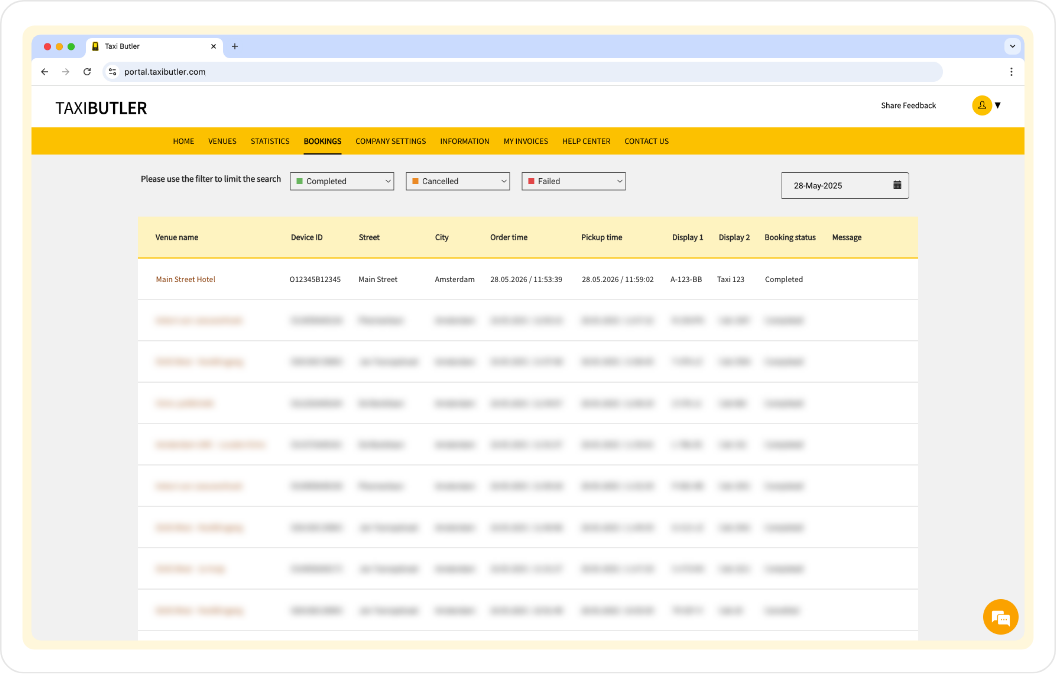 The [Bookings](/fleets/portal/pages/bookings) page lists all bookings processed on Taxi Butler devices & technology.
**The Bookings table includes various data and properties listed below.**
The name of the location where the device is installed.
A unique identifier assigned to the Taxi Butler device installed at the venue.
The street address of the venue.
The city in which the venue is located.
The exact time when the booking was made on the device.
The actual time when the taxi has picked-up the passenger.
Custom messages or information shown on the device's display screens during the booking process.
Indicates the current state of the booking. [See full list of booking statuses here](/fleets/portal/pages/bookings#booking-statutes).
Any note regarding the booking, typically contains information about the booking status.
You can filter bookings by status using the dropdowns at the top of the page and by date by using the datepicker.
## Booking statuses
Bookings made on Taxi Butler devices are assigned a specific status depending on the current stage or condition of a booking in its lifecycle. It is used to track and communicate what has happened — or is happening — with a particular booking. You can find a list of booking statuses and their meanings below.
| **Lifecycle stage** | **Status** | **Description** |
| ------------------- | :---------------------- | :------------------------------------------------------------------------------------------------------------------------------------------ |
| Requested | **Planned / Reserved** | A booking is scheduled for a future time and date. Otherwise known as: Future Booking, Scheduled Booking or Pre-Booking. |
| Requested | **Requested** | A taxi has been requested by a Taxi Butler. A driver has not yet accepted the booking. |
| Active | **Driving to pick-up** | The taxi is on its way to the venue. The driver has accepted the booking. |
| Active | **Arrived at pick-up** | The taxi has arrived at the pick-up location to collect the passenger. |
| Completed | **Completed** | The taxi has dropped off the passenger at their destination. Otherwise known as "Successful Booking". |
| Cancelled | **Cancelled** | The booking has been cancelled, usually on the device or in the PORTAL. |
| Cancelled | **Cancelled by driver** | The booking has been cancelled by the driver. |
| Cancelled | **Car not available** | The booking has been cancelled as there were no cars or taxis available to service the request. |
| Failed | **Failed booking** | The booking has failed for technical or miscellaneous reasons. You can [troubleshoot failed bookings here](/fleets/portal/troubleshooting). |
The [Bookings](/fleets/portal/pages/bookings) page lists all bookings processed on Taxi Butler devices & technology.
**The Bookings table includes various data and properties listed below.**
The name of the location where the device is installed.
A unique identifier assigned to the Taxi Butler device installed at the venue.
The street address of the venue.
The city in which the venue is located.
The exact time when the booking was made on the device.
The actual time when the taxi has picked-up the passenger.
Custom messages or information shown on the device's display screens during the booking process.
Indicates the current state of the booking. [See full list of booking statuses here](/fleets/portal/pages/bookings#booking-statutes).
Any note regarding the booking, typically contains information about the booking status.
You can filter bookings by status using the dropdowns at the top of the page and by date by using the datepicker.
## Booking statuses
Bookings made on Taxi Butler devices are assigned a specific status depending on the current stage or condition of a booking in its lifecycle. It is used to track and communicate what has happened — or is happening — with a particular booking. You can find a list of booking statuses and their meanings below.
| **Lifecycle stage** | **Status** | **Description** |
| ------------------- | :---------------------- | :------------------------------------------------------------------------------------------------------------------------------------------ |
| Requested | **Planned / Reserved** | A booking is scheduled for a future time and date. Otherwise known as: Future Booking, Scheduled Booking or Pre-Booking. |
| Requested | **Requested** | A taxi has been requested by a Taxi Butler. A driver has not yet accepted the booking. |
| Active | **Driving to pick-up** | The taxi is on its way to the venue. The driver has accepted the booking. |
| Active | **Arrived at pick-up** | The taxi has arrived at the pick-up location to collect the passenger. |
| Completed | **Completed** | The taxi has dropped off the passenger at their destination. Otherwise known as "Successful Booking". |
| Cancelled | **Cancelled** | The booking has been cancelled, usually on the device or in the PORTAL. |
| Cancelled | **Cancelled by driver** | The booking has been cancelled by the driver. |
| Cancelled | **Car not available** | The booking has been cancelled as there were no cars or taxis available to service the request. |
| Failed | **Failed booking** | The booking has failed for technical or miscellaneous reasons. You can [troubleshoot failed bookings here](/fleets/portal/troubleshooting). |